Free Client Intake Form Templates for 7 Kinds of Work
Free client intake forms for dog walkers, groomers, cleaners, hair and beauty, tutors, trainers and handymen. Word and PDF, one page each, no sign-up.
A new client books. You'll ask a few questions at the first visit, scribble the answers somewhere, and forget one. It's usually the one that matters: the dog's after-hours vet, the stone countertop that can't take bleach, the patch test you meant to do.
An intake form fixes that. Fill one in before the first booking, and every blank line is a question you haven't asked yet.
Download the client intake forms (Word, .docx) or print the PDF: free, no sign-up. Seven one-page forms, one for each kind of work, ready to print or edit to fit yours.
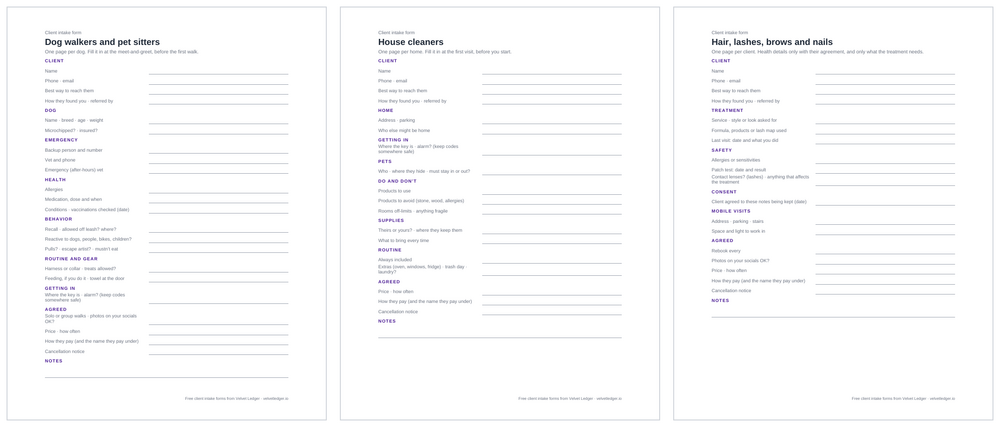
Which form fits my work?
| Form | The question it makes sure you ask |
|---|---|
| Dog walkers and pet sitters | Who's the after-hours vet, and is she allowed off the leash? |
| Pet groomers | Did the owner agree to a shave-down if the coat is matted? |
| House cleaners | Where's the key, who else is home, and what can't be cleaned with what? |
| Hair, lashes, brows and nails | Allergies, the patch test date, and the formula you used last time |
| Tutors and music teachers | Who's the parent or guardian, and who's home during lessons? |
| Personal trainers | Health questionnaire done, injuries to work around, doctor's OK if needed |
| Handymen and home repairs | Where's the water shutoff, what paint was used, who pays for materials? |
Every form starts with the same client details and ends with what you agreed: price, how often, how they pay and the name they pay under, and your cancellation notice.
What should a client intake form include?
Five things, whatever your work:
- Who they are and how to reach them, including the best way, so you're not texting someone who only answers email.
- How they found you, and who referred them, so you know where your work comes from and who to thank.
- What you need to do the job safely: access, pets, allergies, emergency contacts. Only what the work needs.
- What they want: the style, the goal, the routine, the extras.
- What you agreed: price, how they pay, cancellation notice, and whether you can post photos.
How do I use these with clients?
Go through the form with the client at the first visit or meet-and-greet, in order. Owners and clients notice when you ask about the emergency contact before they think to mention it. Fill in what you can, leave the rest blank, and ask about the blanks before the first real booking.
Keep one form per client: per dog, per home, per student. Update it when something changes, like new medication, a new lockbox or a new exam date.
Can I use these forms in Velvet Ledger?
Yes, as a template for your notes:
- Save the questions once. Open your profile menu → Template Library, choose Manage, then the Contacts tab, then New Template. Copy the questions from the Word file, paste them in, and name it ("Dog profile", "Home profile").
- Start a note from it for each client. On the client's card, open the notes and choose Templates, then your form. Fill it in and pin it.
- Leave blanks visible. It's a text template, not a form with required fields, so Velvet Ledger won't stop you saving with gaps. The empty lines are your reminder.
The client's card then holds everything together: their details, where they came from, the note, their bookings and what they've paid.
What about health details and children's information?
Ask only for what the work needs. Tell the client what you're keeping and why, ask them to agree (each form that touches health has a line for the date they agreed), and keep it somewhere safe. The FTC's guide for businesses sums it up in five steps: know what you have, keep only what you need, lock it, dispose of it properly, and plan for a breach (FTC). Rules on keeping health information differ by state, so check yours if you collect it. Don't write lockbox or alarm codes on the form; keep those somewhere safer.
Want the full walkthrough for your work?
- Dog walkers: what to know about every dog
- House cleaners: every home's details and a smarter week
- Paid on Venmo, Cash App or cash? Which payments are income?
Something missing from your form?
We're building Velvet Ledger around how people who work for themselves actually work. If your trade isn't here, or your form asks something ours doesn't, tell us: support@velvetledger.io. We'll add the best ones to the pack.
Sources
Checked October 2026.
- Protecting Personal Information: A Guide for Business, Federal Trade Commission