Dog Walking Clients: What to Know About Every Dog
For dog walkers and pet sitters: one record and one template for every dog, whether bookings come through Rover, another app or word of mouth.
You've been walking dogs for a while now. Some of your regulars came through Rover. Then Priya, one of them, told her friend about you, and now you walk her friend's dog too, booked by text, no app involved. Two systems: half your dogs' details live in app messages, the rest in your texts and your head.
Biscuit's chicken allergy is in an app message from March. That Luna won't come back when called is in your head. Max's vet's number is in a text from his owner's partner. It all works, right up until the day Luna slips her harness by the park gate and you need the vet's number now.
The fix: one record for every dog, wherever the booking came from, built from one template you fill in before the first walk. A blank in the template is a question you haven't asked yet, and you can see it before it matters.
This guide is for dog walkers and pet sitters, whether your bookings come through Rover, another app, or straight from owners who found you.
Last checked: October 2026. The dogs and owners below are made up.
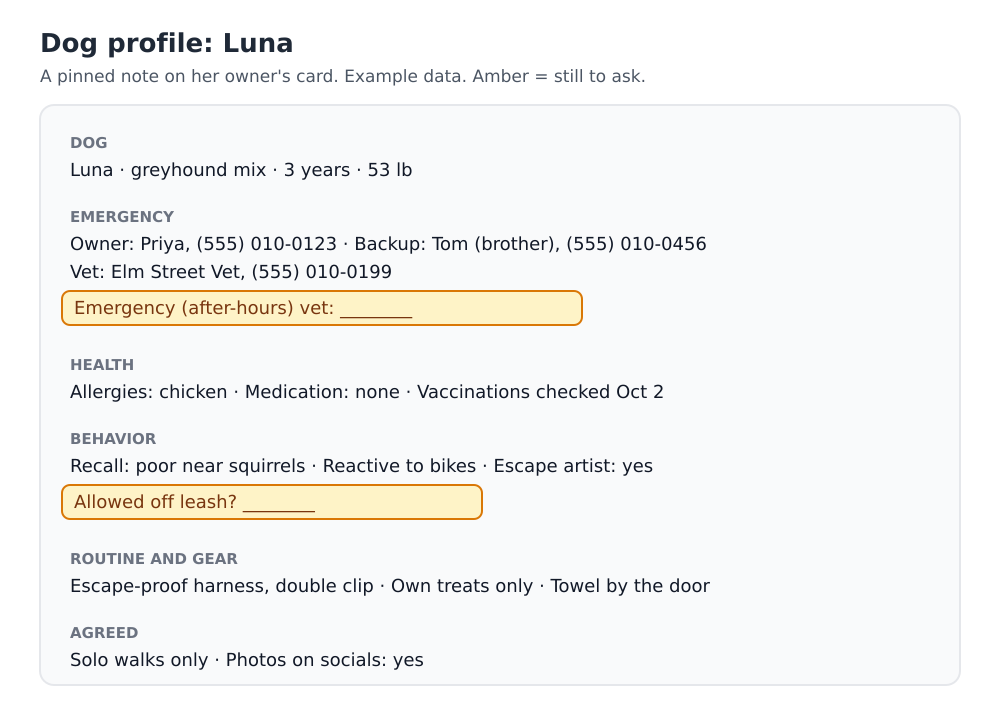
What should a dog walker know about every dog?
Enough to keep the dog safe if something goes wrong, and to walk it the way its owner expects. Copy this and make it yours:
DOG
Name · breed · age · weight · photo

EMERGENCY
Owner's number · backup person and number
Vet and phone · emergency (after-hours) vet
Microchipped? · insured? (and the policy number, if the owner wants you to have it)

HEALTH
Allergies · medication, dose and when · conditions
Vaccinations up to date? (date checked)

BEHAVIOR
Recall · allowed off leash? where?
Reactive to dogs, people, bikes, kids? · pulls? · escape artist?
Anything they mustn't eat or pick up

ROUTINE AND GEAR
Harness or collar · leash · treats allowed? which?
Feeding, if you do it · towel or paw wash at the door

GETTING IN
Where the key is · alarm? (keep codes somewhere safer than a note)

AGREED
Price per walk · group or solo walks?
Photos on your socials OK?
Some clients come through an app, some by word of mouth. How do I keep one system?
Keep the dogs' details in your own record for every client, and let each app do only what it's for: the booking and the payment. The app holds the transaction; your record holds the dog.
- Every owner gets a card, whether you met through Rover, another app, a neighbor or a flyer.
- Note where each one came from. In Velvet Ledger, set the referral source on the owner's card (Rover, a friend, Instagram), and add who referred them. Priya's friend shows "referred by Priya", and Priya's card shows who she sent you, so you know who to thank.
- Same template for everyone. An app booking doesn't mean you can skip the emergency vet.
Over time you'll see which of your clients came from which place, and how much of your book is word of mouth.
How do I set it up in Velvet Ledger?
- Make the template once. Open your profile menu → Template Library, choose Manage, then the Contacts tab, then New Template. Paste the list above and call it "Dog profile".
- Add the owner as a client, with their phone number and how they reach you.
- Start a note per dog. On the owner's card, open the notes and choose Templates → Dog profile. Title it with the dog's name, fill in what you know, and pin it.
- Leave the blanks visible. Don't delete a line you can't answer yet. The empty "Emergency vet:" is your reminder to ask.
It's a text template, not a form: Velvet Ledger won't stop you saving with gaps. The point is that every gap is on the page, where you'll see it.
On paper: print the list, one sheet per dog, kept in a folder in your bag.
What should I ask at a meet-and-greet?
Go down the template in order, with the owner, while the dog sniffs your shoes. It's a natural checklist, and owners notice when you ask about the emergency vet and the escape-artist habit before they think to mention them. Then:
- Ask to see the vaccination record, and note the date you checked it.
- Walk the dog together for five minutes: you'll learn more about recall and pulling than the owner will tell you.
- Fill in the gaps the same day, while you remember.
What if one owner has two dogs?
One note per dog, both on the owner's card. Biscuit's allergy and Bella's medication never end up in the same paragraph, and you can pin both.
How do I keep owners in the loop after each walk?
Owners who get a short update feel looked after, and they rebook. After each walk, add a line to that dog's note or to the walk's appointment: "40 min, pulled at bikes on the bike path, ate a stick, home dry." It becomes a history you can point to when an owner asks how things have been going, and a record of what you noticed if something changes.
Velvet Ledger doesn't message owners for you; send the update the way you already do, and keep the line for yourself.
How do I keep the profiles up to date?
Dogs change: new medication, a new fear of fireworks, a new backup person. Add a repeating task every three months: "Check dog profiles." Go through each pinned note and ask owners about anything that might have moved.
What about payments?
Bookings made through an app are paid through that app; Rover, for example, says a booking that starts on Rover has to be completed there (Rover). For owners who pay you directly, put the name they pay under (their Venmo or Cash App) on their card, and log each walk's payment with how it came in. More on that in which payments are income?.
Does this sound like your week?
We're building Velvet Ledger around how people who work for themselves actually work. If you walk dogs and keep track some other way, or there's something missing from this template, we'd love to hear it: support@velvetledger.io.
Keep going
- Clients pay you on different apps? Venmo, Cash App or cash: which payments are income?
- Want notes and follow-ups that don't feel like work? Your people system
- Need to show your income someday? Make an income packet
Sources
Checked October 2026.