House Cleaners: Every Home's Details and a Smarter Week
For house cleaners: one record of every home, details saved while you text, and a week planned by area, so you're not driving across town twice.
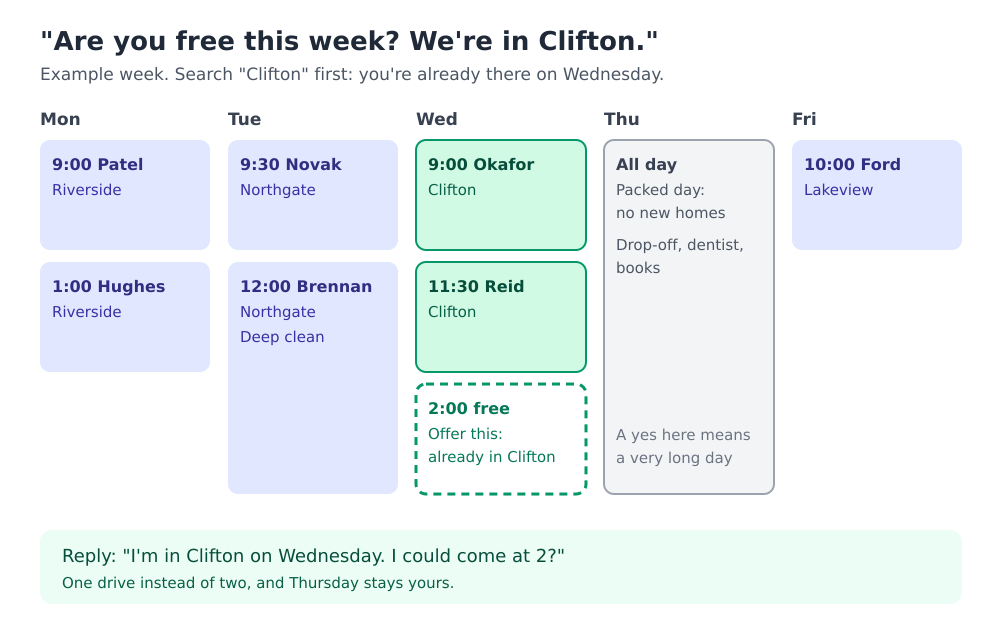
It's Tuesday night. A new client texts: "Are you free Thursday? We're in Clifton." Thursday is open, so you say yes. Then you remember you're already in Clifton on Wednesday, at the Okafors', ten minutes from her door. Now you'll drive across town twice this week, and Thursday was the one day you'd kept for your own errands.
Meanwhile, the Okafors' lockbox location is in a text from June, their cat hides under the bed and mustn't get out, and somewhere in your messages they asked you never to use bleach on the marble.
The fix: a record of every home, built from one template, with every booking's address on it. Then, when someone asks about a day or an area, you can see what you've already got before you answer.
This guide is for house cleaners, whether your clients come through an app like Thumbtack or TaskRabbit, or from the neighbor of a neighbor.
Last checked: October 2026. The homes, clients and streets below are made up.
What should a house cleaner know about every home?
Enough to get in, keep the pets in, and not damage anything. Copy this and make it yours:
HOME
Client name · address · parking · how often (weekly / fortnightly)

GETTING IN
Where the key is · alarm? · who else might be home
(keep codes somewhere safer than a note)

PETS
Who · where they hide · must stay in or out?

DO AND DON'T
Products to use · products to avoid (stone, wood, allergies)
Rooms off-limits · anything fragile or precious

SUPPLIES
Theirs or yours? · where they keep them · vacuum, bags, cloths
What to bring every time (keep it as its own pinned "Kit" note)

ROUTINE
What's always included · what's extra (oven, windows, fridge)
Trash day · laundry?

AGREED
Price per visit · how they pay (and the name they pay under)
Cancellation notice
Some clients come from an app, some from neighbors. How do I keep one system?
Keep every home in your own record, and let each app do only what it's for: the booking and the payment.
- Every client gets a card, wherever they found you.
- Note where each one came from, and who referred them. In Velvet Ledger, the referral source and "referred by" sit on the client's card and show on both people's cards, so you know who to thank and how much of your work is word of mouth.
- Same template for everyone. An app booking still needs the pets and the products.
How do I save details while I'm texting a client?
Don't wait until the evening. While the text is open, open Quick Capture and type it the way you'd say it:
Deep clean for Ana Silva Wednesday 2pm at 14 Elm Road, Clifton
It becomes an appointment on Ana's card, with the address. If she's new, it adds her as a contact when you save, and picks out her phone number if it's in the line. You check everything before it saves. Several things at once? One per line.
Set up the template once: profile menu → Template Library, Manage, the Contacts tab, New Template, paste the list above. Then on each client's card, open the notes and choose Templates to start their home's profile. Pin it.
Someone asks if I'm free in their area. How do I suggest a day I'm already there?
Before you answer, look at where you already are. In Velvet Ledger, open To-Do's and search the area or street: the search reads appointments' addresses, so "Clifton" brings up every booking you have there. Offer the day you're already nearby:
"I'm in Clifton on Wednesday. I could come at 2?"
It saves a drive, a parking fee and an hour of your week. If you want to see areas at a glance, also tag each booking with its area and filter To-Do's by that tag.
How do I see the days that are already too full?
Bookings are only part of a busy day. The school drop-off, your own dentist, the day you always do your books: add those too.
- On the calendar, each booking fills its hours, so a full day looks full.
- Double bookings are flagged when you save: "Clashes with 'Okafors' (1:00–3:00 PM). Save anyway?"
- For a day you know will be hectic, add an all-day entry, such as "Packed day: no new homes." It shows on that day when someone asks. It won't stop you booking over it, so check the day before you say yes.
How do I remember what to pack for each home?
Every home wants something different: the Okafors' marble spray and the soft cloths, the Patels' own vacuum bags, nothing scented at the Reids'. Keep it in two places that work together:
- On the client's card: a pinned "Kit" note, the one list you keep up to date. It's always there when you open their card.
- On the booking: a preparation checklist. Add "Pack from the kit list on Okafors' card", plus anything special for this visit ("oven clean: bring the oven gloves"). Open the booking while you load the car and tick as you pack.
If the booking repeats every week or fortnight, each new visit starts with the same preparation checklist. Because the first item points to the kit note, a change to the kit only needs making in one place.
A client asks for a special product. Who pays?
If a client wants a particular cleaner for her stone countertops and says she'll cover it, log what you spent as an expense on her card and note what her payment covered. Then her payment doesn't look like profit later. More on that in which payments are income?
What about payments?
Bookings made through an app are paid through that app. For clients who pay you directly, put the name they pay under (their Venmo, Cash App or bank name) on their card, and log each visit's payment with how it came in. Logging it straight from the text, in Quick Capture, works here too: "Ana Silva paid $120 Venmo for the deep clean."
Does this sound like your week?
We're building Velvet Ledger around how people who work for themselves actually work. If you clean homes and keep track some other way, or there's something missing from this template, we'd love to hear it: support@velvetledger.io.
Keep going
- Clients pay you on different apps? Venmo, Cash App or cash: which payments are income?
- Also walk dogs, or know someone who does? Dog walking clients: what to know about every dog
- Need to show your income someday? Make an income packet